<?xml version="1.0" encoding="utf-8"?><feed xmlns="http://www.w3.org/2005/Atom" ><generator uri="https://jekyllrb.com/" version="3.10.0">Jekyll</generator><link href="https://mrsandipandas.github.io/feed.xml" rel="self" type="application/atom+xml" /><link href="https://mrsandipandas.github.io/" rel="alternate" type="text/html" /><updated>2026-02-21T08:10:39-08:00</updated><id>https://mrsandipandas.github.io/feed.xml</id><title type="html">Sandipan Das / Roboticist and ML Engineer</title><subtitle>personal description</subtitle><author><name>Sandipan Das</name></author><entry><title type="html">Essential NN modules</title><link href="https://mrsandipandas.github.io/posts/2026/02/nn/modules" rel="alternate" type="text/html" title="Essential NN modules" /><published>2026-02-18T00:00:00-08:00</published><updated>2026-02-18T00:00:00-08:00</updated><id>https://mrsandipandas.github.io/posts/2026/02/nn/nn-modules</id><content type="html" xml:base="https://mrsandipandas.github.io/posts/2026/02/nn/modules"><![CDATA[<!--more-->

<script src="https://cdnjs.cloudflare.com/ajax/libs/mathjax/3.2.2/es5/tex-svg.min.js"></script>
<style>
  /* ── Academic Pages palette ───────────────────────────────────────── */
  :root {
    --ink:         #333333;
    --paper:       #ffffff;
    --cream:       #f3f3f3;
    --accent:      #52adc8;   /* AP's teal/blue link color */
    --accent-dark: #375a7f;
    --muted:       #777777;
    --rule:        #dddddd;
    --highlight:   #eaf4f8;
    --code-bg:     #1c1c2e;
    --code-fg:     #a8d8a8;
    --code-accent: #f8b500;
    --code-dim:    #6b7a8d;
    --danger:      #c0392b;
    --success:     #27ae60;
  }

  /* ── Reset only what we need ────────────────────────────────────── */
  .nn-wrap * { box-sizing: border-box; }
  .nn-wrap {
    width: 100%;
    padding: 0;
    font-family: "Lato", "Helvetica Neue", Helvetica, Arial, sans-serif;
    color: var(--ink);
    line-height: 1.7;
  }

  /* ── Tab navigation ─────────────────────────────────────────────── */
  .nn-nav {
    border-bottom: 2px solid var(--rule);
    display: flex;
    flex-wrap: wrap;
    gap: 0;
    overflow: visible;
    background: var(--cream);
    margin-bottom: 1.5rem;
    border-radius: 4px 4px 0 0;
  }

  .nn-nav button {
    background: none;
    border: none;
    padding: 0.65rem 1rem;
    cursor: pointer;
    font-family: inherit;
    font-size: 0.72rem;
    letter-spacing: 0.06em;
    text-transform: uppercase;
    color: var(--muted);
    border-bottom: 3px solid transparent;
    margin-bottom: -2px;
    transition: all 0.2s;
    white-space: nowrap;
    font-weight: 600;
    flex-shrink: 0;
  }

  .nn-nav button:hover { color: var(--ink); }
  .nn-nav button.active {
    color: var(--accent-dark);
    border-bottom-color: var(--accent);
  }

  /* ── Tab panels ─────────────────────────────────────────────────── */
  .module-grid { display: none; animation: fadeIn 0.3s ease; }
  .module-grid.active { display: block; }

  @keyframes fadeIn {
    from { opacity: 0; transform: translateY(6px); }
    to   { opacity: 1; transform: translateY(0); }
  }

  /* ── Card ───────────────────────────────────────────────────────── */
  .module-card {
    border: 1px solid var(--rule);
    background: var(--paper);
    margin-bottom: 1.25rem;
    border-radius: 4px;
    transition: box-shadow 0.2s;
  }

  .module-card:hover { box-shadow: 0 2px 10px rgba(0,0,0,0.08); }

  .card-header {
    display: grid;
    grid-template-columns: auto 1fr auto;
    align-items: start;
    gap: 1rem;
    padding: 1rem 1.25rem;
    cursor: pointer;
    border-bottom: 1px solid transparent;
    transition: border-color 0.2s;
  }

  .card-header:hover { background: var(--cream); border-radius: 4px 4px 0 0; }

  .card-number {
    font-size: 0.7rem;
    color: var(--muted);
    padding-top: 0.25rem;
    font-weight: 600;
    min-width: 24px;
  }

  .card-title {
    font-size: 1.1rem;
    font-weight: 700;
    color: var(--ink);
  }

  .card-subtitle {
    font-size: 0.82rem;
    color: var(--muted);
    margin-top: 0.15rem;
  }

  .card-tag {
    font-size: 0.62rem;
    padding: 0.2rem 0.55rem;
    border-radius: 3px;
    background: var(--highlight);
    color: var(--accent-dark);
    letter-spacing: 0.07em;
    text-transform: uppercase;
    font-weight: 700;
    white-space: nowrap;
    align-self: start;
    margin-top: 0.15rem;
  }

  .toggle-arrow { transition: transform 0.25s; font-size: 0.75rem; color: var(--muted); margin-top: 0.3rem; user-select: none; }
  .toggle-arrow.open { transform: rotate(180deg); }

  /* ── Card body ──────────────────────────────────────────────────── */
  .card-body { padding: 0 1.25rem 1.25rem; display: none; }
  .card-body.open { display: block; }

  .card-cols {
    display: grid;
    grid-template-columns: 1fr 1fr;
    gap: 1rem;
    margin-top: 1rem;
    width: 100%;
  }

  @media (max-width: 700px) { .card-cols { grid-template-columns: 1fr; } }

  /* ── Math panel ─────────────────────────────────────────────────── */
  .math-section {
    background: var(--cream);
    border: 1px solid var(--rule);
    border-radius: 4px;
    padding: 1.1rem;
  }

  .section-label {
    font-size: 0.6rem;
    letter-spacing: 0.18em;
    text-transform: uppercase;
    color: var(--accent);
    margin-bottom: 0.75rem;
    font-weight: 700;
  }

  .math-block { font-size: 1rem; overflow-x: auto; padding: 0.3rem 0; line-height: 2; }

  .math-note { font-size: 0.8rem; color: var(--muted); font-style: italic; margin-top: 0.75rem; line-height: 1.5; }

  .math-vars { margin-top: 0.75rem; font-size: 0.78rem; color: var(--muted); }
  .math-vars li { list-style: none; padding: 0.18rem 0; display: flex; gap: 0.5rem; border-bottom: 1px dotted var(--rule); }
  .math-vars li:last-child { border-bottom: none; }
  .var-sym { font-family: "Courier New", monospace; color: var(--accent-dark); min-width: 60px; font-weight: 700; }

  /* ── Code panel ─────────────────────────────────────────────────── */
  .code-section {
    background: var(--code-bg);
    border: 1px solid #2a2a3e;
    border-radius: 4px;
    padding: 1.1rem;
    overflow: hidden;
  }

  .code-section .section-label { color: var(--code-accent); opacity: 0.8; }

  pre { font-family: "Courier New", Courier, monospace; font-size: 0.76rem; line-height: 1.7; overflow-x: auto; color: var(--code-fg); margin: 0; }

  .kw  { color: #bb9af7; } .cls { color: #7dcfff; } .fn  { color: #7aa2f7; }
  .str { color: #9ece6a; } .num { color: #ff9e64; } .cm  { color: var(--code-dim); font-style: italic; }
  .self{ color: #e0af68; }

  /* ── Intuition box ──────────────────────────────────────────────── */
  .intuition-box {
    margin-top: 1rem;
    border-left: 3px solid var(--accent);
    padding: 0.75rem 1rem;
    background: var(--highlight);
    border-radius: 0 4px 4px 0;
  }

  .intuition-box p { font-size: 0.85rem; color: var(--ink); line-height: 1.6; }

  /* ── Use/avoid chips ────────────────────────────────────────────── */
  .chips { display: flex; flex-wrap: wrap; gap: 0.4rem; margin-top: 0.75rem; }
  .chip { font-size: 0.63rem; padding: 0.18rem 0.5rem; border-radius: 3px; font-weight: 600; letter-spacing: 0.04em; }
  .chip.use   { background: #e8f5e9; color: #2e7d32; }
  .chip.avoid { background: #fce4ec; color: #c62828; }

  mjx-container { display: inline-block !important; }
</style>

<div class="nn-wrap">

<nav class="nn-nav" id="nav">
  <button class="active" data-tab="all">All Modules</button>
  <button data-tab="core">Core Layers</button>
  <button data-tab="norm">Normalization</button>
  <button data-tab="act">Activations</button>
  <button data-tab="attn">Attention</button>
  <button data-tab="loss">Loss Functions</button>
</nav>

<div class="module-grid active" id="tab-all"></div>
<div class="module-grid" id="tab-core"></div>
<div class="module-grid" id="tab-norm"></div>
<div class="module-grid" id="tab-act"></div>
<div class="module-grid" id="tab-attn"></div>
<div class="module-grid" id="tab-loss"></div>

</div>

<script>
const modules = [
  {
    id: 1, name: "Linear (Dense) Layer", subtitle: "Affine transformation", tag: "core", tagLabel: "Core Layer",
    math: String.raw`\mathbf{y} = \mathbf{x}\mathbf{W}^T + \mathbf{b}`,
    mathExtra: String.raw`\mathbf{W} \in \mathbb{R}^{d_{out} \times d_{in}}, \quad \mathbf{b} \in \mathbb{R}^{d_{out}}`,
    vars: [["x","Input of shape (N, d_in)"],["W","Weight matrix, shape (d_out, d_in)"],["b","Bias vector, shape (d_out,)"],["y","Output of shape (N, d_out)"]],
    note: "Initialized with Kaiming uniform by default. Bias adds a constant offset to each neuron's output, acting as a learnable threshold.",
    code: `<span class="kw">import</span> torch.nn <span class="kw">as</span> nn\n\n<span class="cm"># Define</span>\nlayer = nn.<span class="cls">Linear</span>(<span class="num">512</span>, <span class="num">256</span>, bias=<span class="kw">True</span>)\n\n<span class="cm"># Custom weight init</span>\nnn.init.<span class="fn">kaiming_normal_</span>(layer.weight)\nnn.init.<span class="fn">zeros_</span>(layer.bias)\n\n<span class="cm"># Forward</span>\nx = torch.<span class="fn">randn</span>(<span class="num">32</span>, <span class="num">512</span>)\ny = <span class="fn">layer</span>(x)  <span class="cm"># → 32×256</span>`,
    intuition: "Every hidden unit computes a weighted sum of all inputs plus a bias — a learnable hyperplane decision boundary. Stack many of these and you get universal function approximation.",
    useTags: ["Fully-connected heads","MLPs","Projection layers","Classification"],
    avoidTags: ["Spatial data (use Conv)","Sequential data (use RNN/Attn)"],
  },
  {
    id: 2, name: "Conv2d", subtitle: "Spatial feature extraction", tag: "core", tagLabel: "Core Layer",
    math: String.raw`(f * k)_{i,j} = \sum_{m}\sum_{n} x_{i+m,\,j+n} \cdot k_{m,n}`,
    mathExtra: String.raw`d_{out} = \left\lfloor \frac{d_{in} + 2p - k}{s} \right\rfloor + 1`,
    vars: [["x","Input feature map (N,C,H,W)"],["k","Kernel of size k×k"],["p","Padding"],["s","Stride"]],
    note: "Weight sharing across spatial positions gives translation equivariance. Each output channel learns a distinct spatial pattern detector.",
    code: `<span class="cm"># Standard 3×3 conv (same padding)</span>\nconv = nn.<span class="cls">Conv2d</span>(\n    in_channels=<span class="num">64</span>,\n    out_channels=<span class="num">128</span>,\n    kernel_size=<span class="num">3</span>,\n    padding=<span class="num">1</span>,\n    stride=<span class="num">1</span>\n)\n\n<span class="cm"># Depthwise-separable (efficient)</span>\ndw = nn.<span class="cls">Conv2d</span>(<span class="num">64</span>, <span class="num">64</span>, <span class="num">3</span>, groups=<span class="num">64</span>, padding=<span class="num">1</span>)\npw = nn.<span class="cls">Conv2d</span>(<span class="num">64</span>, <span class="num">128</span>, <span class="num">1</span>)`,
    intuition: "A sliding window that shares weights across the image — detecting edges, textures, or patterns regardless of position. Depth-wise separable convolutions get ~8× fewer parameters at little accuracy cost.",
    useTags: ["Image classification","Object detection","Segmentation","Any 2D spatial data"],
    avoidTags: ["1D sequences (use Conv1d)","Non-spatial graphs"],
  },
  {
    id: 3, name: "Batch Normalization", subtitle: "Stabilize activations per mini-batch", tag: "norm", tagLabel: "Normalization",
    math: String.raw`\hat{x}_i = \frac{x_i - \mu_\mathcal{B}}{\sqrt{\sigma^2_\mathcal{B} + \epsilon}}`,
    mathExtra: String.raw`y_i = \gamma\,\hat{x}_i + \beta, \quad \mu_\mathcal{B} = \frac{1}{m}\sum_{i=1}^m x_i`,
    vars: [["μ_B","Mini-batch mean"],["σ²_B","Mini-batch variance"],["γ, β","Learnable scale and shift"],["ε","Numerical stability (1e-5)"]],
    note: "At inference, uses running statistics (exponential moving average). Breaks independence between samples — avoid with tiny batch sizes.",
    code: `bn = nn.<span class="cls">BatchNorm2d</span>(<span class="num">128</span>)\nbn1d = nn.<span class="cls">BatchNorm1d</span>(<span class="num">512</span>)\n\n<span class="cm"># Typical conv block</span>\nblock = nn.<span class="cls">Sequential</span>(\n    nn.<span class="cls">Conv2d</span>(<span class="num">64</span>, <span class="num">128</span>, <span class="num">3</span>, padding=<span class="num">1</span>),\n    nn.<span class="cls">BatchNorm2d</span>(<span class="num">128</span>),\n    nn.<span class="cls">ReLU</span>(inplace=<span class="kw">True</span>),\n)\n\n<span class="cm"># Freeze stats</span>\nbn.<span class="fn">eval</span>()\n<span class="kw">for</span> p <span class="kw">in</span> bn.<span class="fn">parameters</span>(): p.requires_grad = <span class="kw">False</span>`,
    intuition: "Normalizing each channel's distribution prevents internal covariate shift — gradients flow more uniformly, allowing higher learning rates.",
    useTags: ["CNNs","ResNets","Large batch training","Computer vision"],
    avoidTags: ["Batch size < 8","RNNs","Transformers (use LayerNorm)"],
  },
  {
    id: 4, name: "Layer Normalization", subtitle: "Normalize across the feature dimension", tag: "norm", tagLabel: "Normalization",
    math: String.raw`\text{LN}(\mathbf{x}) = \frac{\mathbf{x} - \mu}{\sqrt{\sigma^2 + \epsilon}} \odot \gamma + \beta`,
    mathExtra: String.raw`\mu = \frac{1}{H}\sum_{i=1}^H x_i, \quad \sigma^2 = \frac{1}{H}\sum_{i=1}^H (x_i - \mu)^2`,
    vars: [["H","Number of features (not batch size)"],["γ, β","Learnable, shape (H,)"],["⊙","Element-wise multiply"]],
    note: "Statistics computed over the feature dimension, not the batch. Works identically at train and inference time, independent of batch size.",
    code: `<span class="cm"># Transformer standard</span>\nln = nn.<span class="cls">LayerNorm</span>(<span class="num">512</span>)\n\n<span class="cm"># Pre-norm (modern style)</span>\n<span class="kw">class</span> <span class="cls">PreNormBlock</span>(nn.<span class="cls">Module</span>):\n    <span class="kw">def</span> <span class="fn">forward</span>(<span class="self">self</span>, x):\n        <span class="kw">return</span> x + <span class="self">self</span>.layer(<span class="self">self</span>.norm(x))\n\nln = nn.<span class="cls">LayerNorm</span>(<span class="num">512</span>, eps=<span class="num">1e-6</span>)`,
    intuition: "The workhorse of transformers. Normalizes within each sample independently, so batch size doesn't matter — critical for variable-length sequences and language models.",
    useTags: ["Transformers","LLMs","NLP","Any variable-batch scenario"],
    avoidTags: ["CNNs on images (BatchNorm or GroupNorm preferred)"],
  },
  {
    id: 5, name: "ReLU & Variants", subtitle: "The most common nonlinearities", tag: "act", tagLabel: "Activation",
    math: String.raw`\text{ReLU}(x) = \max(0, x)`,
    mathExtra: String.raw`\text{GELU}(x) = x \cdot \Phi(x) \approx x \cdot \sigma(1.702\,x)`,
    vars: [["Φ(x)","CDF of standard normal"],["σ(x)","Sigmoid function"]],
    note: "ReLU: O(1), sparse activations, dead neuron risk. GELU: smooth, probabilistic interpretation, used in GPT/BERT. SiLU=x·σ(x) (Swish) used in LLaMA.",
    code: `relu  = nn.<span class="cls">ReLU</span>(inplace=<span class="kw">True</span>)\ngelu  = nn.<span class="cls">GELU</span>()\nsilu  = nn.<span class="cls">SiLU</span>()  <span class="cm"># Swish</span>\nlrelu = nn.<span class="cls">LeakyReLU</span>(<span class="num">0.01</span>)\n\n<span class="cm"># Functional form</span>\n<span class="kw">import</span> torch.nn.functional <span class="kw">as</span> F\ny = F.<span class="fn">gelu</span>(x)\n\n<span class="cm"># Dead neuron diagnostic</span>\ndead = (x.<span class="fn">detach</span>() &lt;= <span class="num">0</span>).<span class="fn">float</span>().<span class="fn">mean</span>()`,
    intuition: "Nonlinearities allow networks to learn non-linear functions. ReLU's sparsity is computationally cheap; GELU's smooth gradient curve helps optimization in deep transformers.",
    useTags: ["ReLU: CNNs, MLPs","GELU: Transformers, LLMs","SiLU: Vision transformers"],
    avoidTags: ["Sigmoid/Tanh in hidden layers (vanishing gradients at depth)"],
  },
  {
    id: 6, name: "Softmax", subtitle: "Probability distribution over classes", tag: "act", tagLabel: "Activation",
    math: String.raw`\text{softmax}(x_i) = \frac{e^{x_i}}{\sum_{j=1}^K e^{x_j}}`,
    mathExtra: String.raw`\text{log-softmax}(x_i) = x_i - \log\!\sum_j e^{x_j}`,
    vars: [["x_i","Raw logit for class i"],["K","Number of classes"]],
    note: "Numerically stable: subtract max(x) before exponentiating. PyTorch's CrossEntropyLoss applies log-softmax internally — don't add softmax before it!",
    code: `<span class="cm"># Stable softmax</span>\n<span class="kw">def</span> <span class="fn">stable_softmax</span>(x):\n    x = x - x.<span class="fn">max</span>(dim=-<span class="num">1</span>, keepdim=<span class="kw">True</span>).values\n    <span class="kw">return</span> F.<span class="fn">softmax</span>(x, dim=-<span class="num">1</span>)\n\n<span class="cm"># Temperature scaling</span>\n<span class="kw">def</span> <span class="fn">softmax_T</span>(x, T=<span class="num">1.0</span>):\n    <span class="kw">return</span> F.<span class="fn">softmax</span>(x / T, dim=-<span class="num">1</span>)\n\n<span class="cm"># For loss: don't apply softmax</span>\nloss = nn.<span class="cls">CrossEntropyLoss</span>()(logits, targets)`,
    intuition: "Squashes arbitrary logits into a valid probability simplex (sum to 1, all positive). Temperature T < 1 sharpens; T > 1 smooths (used in knowledge distillation).",
    useTags: ["Classification outputs","Attention weights","Autoregressive sampling"],
    avoidTags: ["Before CrossEntropyLoss (double-applies normalization)"],
  },
  {
    id: 7, name: "Multi-Head Attention", subtitle: "Scaled dot-product attention, parallel heads", tag: "attn", tagLabel: "Attention",
    math: String.raw`\text{Attn}(Q,K,V) = \text{softmax}\!\left(\frac{QK^T}{\sqrt{d_k}}\right)V`,
    mathExtra: String.raw`\text{MHA} = \text{Concat}(\text{head}_1,\ldots,\text{head}_h)\,W^O`,
    vars: [["Q,K,V","Query, Key, Value matrices"],["d_k","Head dimension (d_model/h)"],["h","Number of attention heads"],["W^O","Output projection"]],
    note: "The √d_k scaling prevents dot products from growing large and pushing softmax into saturated regions. Each head attends to different representational subspaces.",
    code: `<span class="kw">class</span> <span class="cls">MHA</span>(nn.<span class="cls">Module</span>):\n    <span class="kw">def</span> <span class="fn">__init__</span>(<span class="self">self</span>, d, h=<span class="num">8</span>):\n        <span class="kw">super</span>().<span class="fn">__init__</span>()\n        <span class="self">self</span>.attn = nn.<span class="cls">MultiheadAttention</span>(\n            d, h, dropout=<span class="num">0.1</span>,\n            batch_first=<span class="kw">True</span>\n        )\n\n    <span class="kw">def</span> <span class="fn">forward</span>(<span class="self">self</span>, x, mask=<span class="kw">None</span>):\n        <span class="kw">return</span> <span class="self">self</span>.attn(x, x, x, attn_mask=mask)[<span class="num">0</span>]`,
    intuition: "Attention lets every position directly attend to every other — no recurrence needed. Multiple heads capture different relationship types in parallel.",
    useTags: ["Transformers","LLMs","Vision transformers","Self/Cross-attention"],
    avoidTags: ["Very long sequences (O(n²) — use FlashAttention or sparse variants)"],
  },
  {
    id: 8, name: "Dropout", subtitle: "Stochastic regularization", tag: "core", tagLabel: "Core Layer",
    math: String.raw`y_i = \begin{cases} 0 & \text{with prob. } p \\ \dfrac{x_i}{1-p} & \text{with prob. } 1-p \end{cases}`,
    mathExtra: String.raw`\mathbb{E}[y_i] = x_i \quad \text{(inverted dropout)}`,
    vars: [["p","Drop probability (typically 0.1–0.5)"]],
    note: "PyTorch uses inverted dropout: scales active units by 1/(1-p) during training so expected values match at inference without any scaling adjustment.",
    code: `drop   = nn.<span class="cls">Dropout</span>(p=<span class="num">0.1</span>)\ndrop2d = nn.<span class="cls">Dropout2d</span>(p=<span class="num">0.1</span>)\n\nmodel.<span class="fn">train</span>()   <span class="cm"># dropout active</span>\nmodel.<span class="fn">eval</span>()    <span class="cm"># dropout disabled</span>\n\n<span class="cm"># Monte-Carlo inference</span>\n<span class="kw">def</span> <span class="fn">mc_predict</span>(model, x, n=<span class="num">100</span>):\n    model.<span class="fn">train</span>()\n    preds = [<span class="fn">model</span>(x) <span class="kw">for</span> _ <span class="kw">in</span> <span class="fn">range</span>(n)]\n    <span class="kw">return</span> torch.<span class="fn">stack</span>(preds).<span class="fn">mean</span>(<span class="num">0</span>)`,
    intuition: "Randomly zeroing activations forces the network to learn redundant representations. Monte-Carlo dropout gives free uncertainty estimates at inference.",
    useTags: ["After Linear layers","Transformers","General regularization"],
    avoidTags: ["After BatchNorm (interferes with statistics)","Final conv layers in CNNs"],
  },
  {
    id: 9, name: "Embedding", subtitle: "Discrete token → dense vector", tag: "core", tagLabel: "Core Layer",
    math: String.raw`\mathbf{e}_i = \mathbf{W}_E[i], \quad \mathbf{W}_E \in \mathbb{R}^{V \times d}`,
    mathExtra: String.raw`\text{lookup: } \mathbf{e} = \mathbf{W}_E^T \mathbf{o}_i`,
    vars: [["V","Vocabulary size"],["d","Embedding dimension"],["i","Token index"]],
    note: "A learnable lookup table. Semantically similar tokens cluster together in embedding space after training.",
    code: `emb = nn.<span class="cls">Embedding</span>(\n    num_embeddings=<span class="num">32000</span>,\n    embedding_dim=<span class="num">512</span>,\n    padding_idx=<span class="num">0</span>,\n)\n\n<span class="cm"># Positional embedding</span>\npos_emb = nn.<span class="cls">Embedding</span>(<span class="num">2048</span>, <span class="num">512</span>)\npos = torch.<span class="fn">arange</span>(seq_len)\nx = token_emb(ids) + pos_emb(pos)\n\n<span class="cm"># Tie input/output weights</span>\nlm_head.weight = emb.weight`,
    intuition: "Maps discrete symbols into a continuous geometric space where the model can reason about similarity through standard linear algebra.",
    useTags: ["Language models","Recommendation systems","Any categorical variable"],
    avoidTags: ["Continuous inputs (use Linear directly)"],
  },
  {
    id: 10, name: "Cross-Entropy Loss", subtitle: "Classification objective", tag: "loss", tagLabel: "Loss Function",
    math: String.raw`\mathcal{L} = -\sum_{i=1}^N y_i \log \hat{p}_i`,
    mathExtra: String.raw`= -\log \hat{p}_c \quad \text{(for ground-truth class } c\text{)}`,
    vars: [["y_i","One-hot target label"],["p̂_i","Predicted probability"],["c","Ground-truth class index"]],
    note: "PyTorch's nn.CrossEntropyLoss = log_softmax + NLLLoss. Takes raw logits as input.",
    code: `criterion = nn.<span class="cls">CrossEntropyLoss</span>(\n    weight=class_weights,\n    ignore_index=<span class="num">-100</span>,\n    label_smoothing=<span class="num">0.1</span>,\n)\n\nlogits = model(x)  <span class="cm"># raw, not softmax</span>\nloss = <span class="fn">criterion</span>(logits, targets)\n\n<span class="cm"># Inference probabilities</span>\nprobs = F.<span class="fn">softmax</span>(logits, dim=-<span class="num">1</span>)`,
    intuition: "Minimizing cross-entropy is equivalent to maximum likelihood estimation of the class distribution. It penalizes confident wrong predictions much more harshly.",
    useTags: ["Multi-class classification","Language model next-token prediction"],
    avoidTags: ["Regression (use MSE/Huber)","Multi-label (use BCE per class)"],
  },
  {
    id: 11, name: "LSTM", subtitle: "Long Short-Term Memory cell", tag: "core", tagLabel: "Core Layer",
    math: String.raw`\mathbf{f}_t = \sigma\!\left(W_f [\mathbf{h}_{t-1},\mathbf{x}_t]+b_f\right)`,
    mathExtra: String.raw`\mathbf{c}_t = \mathbf{f}_t \odot \mathbf{c}_{t-1} + \mathbf{i}_t \odot \tilde{\mathbf{c}}_t`,
    vars: [["f_t","Forget gate"],["i_t","Input gate"],["c_t","Cell state (long-term memory)"],["h_t","Hidden state (output)"]],
    note: "Four gate matrices each of size d_h × (d_h + d_x). Total parameters: 4 × d_h × (d_h + d_x + 1).",
    code: `lstm = nn.<span class="cls">LSTM</span>(\n    input_size=<span class="num">128</span>,\n    hidden_size=<span class="num">256</span>,\n    num_layers=<span class="num">2</span>,\n    batch_first=<span class="kw">True</span>,\n    dropout=<span class="num">0.2</span>,\n    bidirectional=<span class="kw">True</span>,\n)\n\nh0 = torch.<span class="fn">zeros</span>(<span class="num">4</span>, batch, <span class="num">256</span>)\nc0 = torch.<span class="fn">zeros</span>(<span class="num">4</span>, batch, <span class="num">256</span>)\nout, (hn, cn) = <span class="fn">lstm</span>(x, (h0, c0))`,
    intuition: "The forget gate solves vanilla RNN's vanishing gradient problem. Largely superseded by Transformers for long sequences, but still useful for streaming/online scenarios.",
    useTags: ["Time series","Audio","Streaming inference","Stateful processing"],
    avoidTags: ["Long contexts (>512 tokens) where Transformers are faster"],
  },
  {
    id: 12, name: "MSE & Huber Loss", subtitle: "Regression objectives", tag: "loss", tagLabel: "Loss Function",
    math: String.raw`\mathcal{L}_{\text{MSE}} = \frac{1}{N}\sum_{i=1}^N (y_i - \hat{y}_i)^2`,
    mathExtra: String.raw`\mathcal{L}_\delta = \begin{cases} \tfrac{1}{2}r^2 & |r| \le \delta \\ \delta(|r|-\tfrac{\delta}{2}) & |r| > \delta \end{cases}`,
    vars: [["r","Residual y_i − ŷ_i"],["δ","Huber threshold (default 1.0)"]],
    note: "MSE: sensitive to outliers (quadratic growth). Huber: transitions to L1 beyond δ, outlier-robust while maintaining smooth gradients near zero.",
    code: `mse   = nn.<span class="cls">MSELoss</span>()\nmae   = nn.<span class="cls">L1Loss</span>()\nhuber = nn.<span class="cls">HuberLoss</span>(delta=<span class="num">1.0</span>)\n\nloss = <span class="fn">mse</span>(pred, target)\n\n<span class="cm"># Log-cosh (very smooth)</span>\n<span class="kw">def</span> <span class="fn">log_cosh</span>(pred, target):\n    r = pred - target\n    <span class="kw">return</span> torch.<span class="fn">log</span>(torch.<span class="fn">cosh</span>(r)).<span class="fn">mean</span>()\n\n<span class="cm"># Weighted MSE</span>\nloss = ((pred - target)**<span class="num">2</span> * weights).<span class="fn">mean</span>()`,
    intuition: "MSE penalizes large errors quadratically — great when targets are clean, terrible with outliers. Huber gives you the best of both worlds.",
    useTags: ["MSE: clean regression","Huber: regression with outliers, RL value functions"],
    avoidTags: ["Classification (use CrossEntropy)","Distributions (use KL divergence)"],
  },
];

function renderCard(m, idx) {
  return `
  <div class="module-card">
    <div class="card-header" onclick="toggleCard(this)">
      <span class="card-number">${String(m.id).padStart(2,'0')}</span>
      <div>
        <div class="card-title">${m.name}</div>
        <div class="card-subtitle">${m.subtitle}</div>
      </div>
      <div style="display:flex;flex-direction:column;align-items:flex-end;gap:0.35rem">
        <span class="card-tag">${m.tagLabel}</span>
        <span class="toggle-arrow">▾</span>
      </div>
    </div>
    <div class="card-body ${idx === 0 ? 'open' : ''}">
      <div class="card-cols">
        <div class="math-section">
          <div class="section-label">Mathematics</div>
          <div class="math-block">\\(${m.math}\\)</div>
          <div class="math-block">\\(${m.mathExtra}\\)</div>
          <ul class="math-vars">
            ${m.vars.map(v => `<li><span class="var-sym">${v[0]}</span><span>${v[1]}</span></li>`).join('')}
          </ul>
          <div class="math-note">${m.note}</div>
        </div>
        <div class="code-section">
          <div class="section-label">PyTorch</div>
          <pre>${m.code}</pre>
        </div>
      </div>
      <div class="intuition-box">
        <p><strong>Intuition:</strong> ${m.intuition}</p>
        <div class="chips">
          ${m.useTags.map(t => `<span class="chip use">✓ ${t}</span>`).join('')}
          ${m.avoidTags.map(t => `<span class="chip avoid">✗ ${t}</span>`).join('')}
        </div>
      </div>
    </div>
  </div>`;
}

function toggleCard(header) {
  const body = header.nextElementSibling;
  const arrow = header.querySelector('.toggle-arrow');
  const isOpen = body.classList.contains('open');
  body.classList.toggle('open', !isOpen);
  arrow.classList.toggle('open', !isOpen);
}

const tabAll = document.getElementById('tab-all');
const tabMaps = { core:'tab-core', norm:'tab-norm', act:'tab-act', attn:'tab-attn', loss:'tab-loss' };

modules.forEach((m, idx) => {
  tabAll.innerHTML += renderCard(m, idx);
  const tabEl = document.getElementById(tabMaps[m.tag]);
  if (tabEl) tabEl.innerHTML += renderCard(m, tabEl.children.length);
});

MathJax.typesetPromise();

document.getElementById('nav').addEventListener('click', e => {
  const btn = e.target.closest('button');
  if (!btn) return;
  document.querySelectorAll('.nn-nav button').forEach(b => b.classList.remove('active'));
  document.querySelectorAll('.module-grid').forEach(g => g.classList.remove('active'));
  btn.classList.add('active');
  document.getElementById('tab-' + btn.dataset.tab).classList.add('active');
});
</script>]]></content><author><name>Sandipan Das</name></author><category term="NN" /><category term="Core ML" /><category term="AI" /><category term="MachineLearning" /><summary type="html"><![CDATA[]]></summary></entry><entry><title type="html">Generative AI for all: Video Diffusion models</title><link href="https://mrsandipandas.github.io/posts/2025/09/genai/videodiffusion" rel="alternate" type="text/html" title="Generative AI for all: Video Diffusion models" /><published>2025-09-21T00:00:00-07:00</published><updated>2025-09-21T00:00:00-07:00</updated><id>https://mrsandipandas.github.io/posts/2025/09/genai/genai-video-diffusion</id><content type="html" xml:base="https://mrsandipandas.github.io/posts/2025/09/genai/videodiffusion"><![CDATA[<!--more-->

<h1 id="introduction">Introduction</h1>

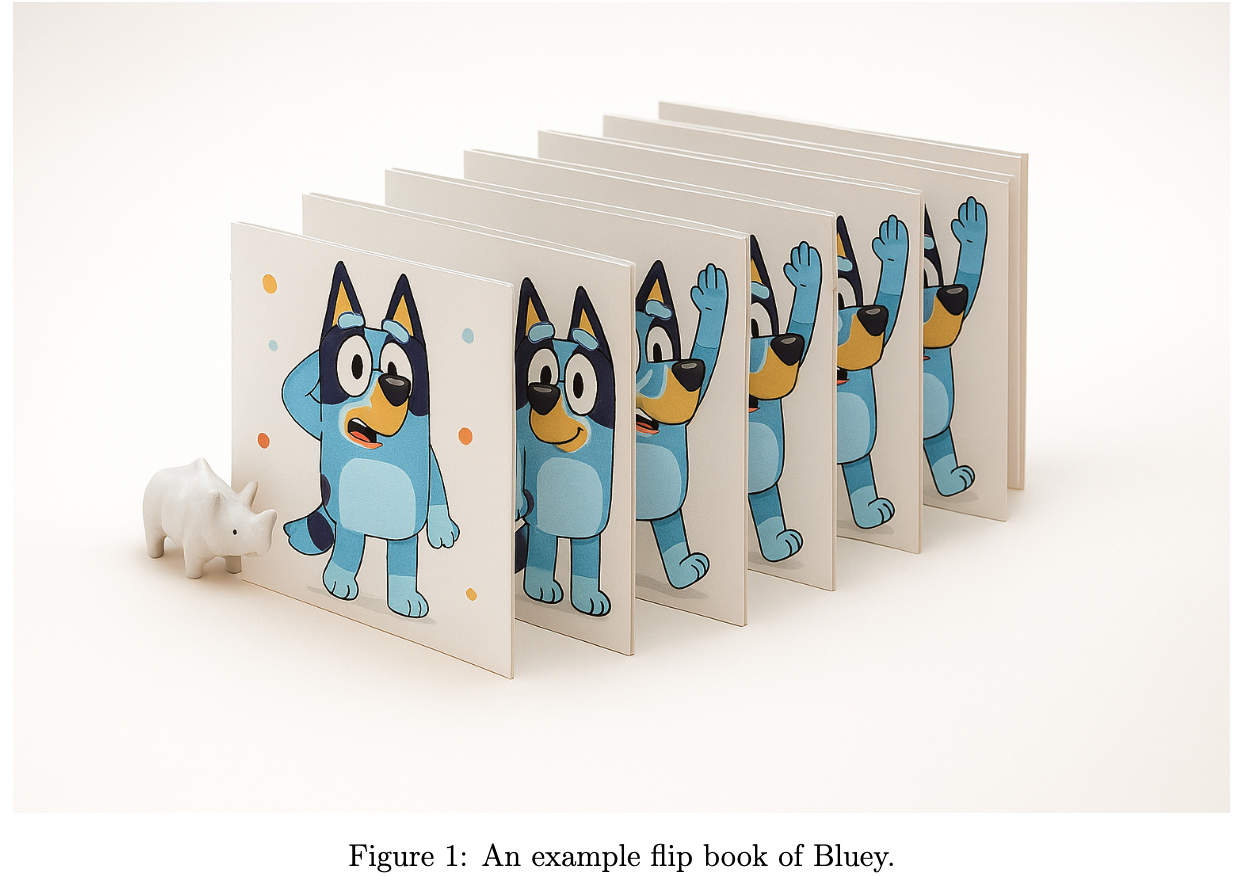
<p>Have you ever played with a flipbook? You draw a picture on each page, and when you flip the pages really fast, the pictures move like a cartoon. Fun, right?</p>

<p><img src="/images/posts/2025-09-21-genai-video-diffusion-images/1.png" alt="An example flip book of Bluey." /></p>

<p>Now, let’s make it magical! Imagine a magic machine that doesn’t just draw one picture for you - it creates a whole flip book! And not just any flip book… this one makes the pictures move smoothly, like real life. Why is that important? Because a video is nothing more than a bunch of pictures shown one after another. If the pictures change too much from one page to the next, the motion looks jumpy and weird. But if each picture changes just a little, the motion feels natural and smooth.</p>

<p>That’s what video diffusion models do! They work super hard to make sure every picture in the flip book connects nicely to the next one, so your story flows like magic.</p>

<h1 id="on-learning-of-magical-machines">On learning of magical machines</h1>

<p>Let us continue from our classroom story. The teacher comes back to class and says,</p>

<blockquote>
  <p>“Guess what, kids? Today, we’re not just drawing one picture - we’re making a whole magic flip book. But, first let us see some before you get to make your own!”</p>
</blockquote>

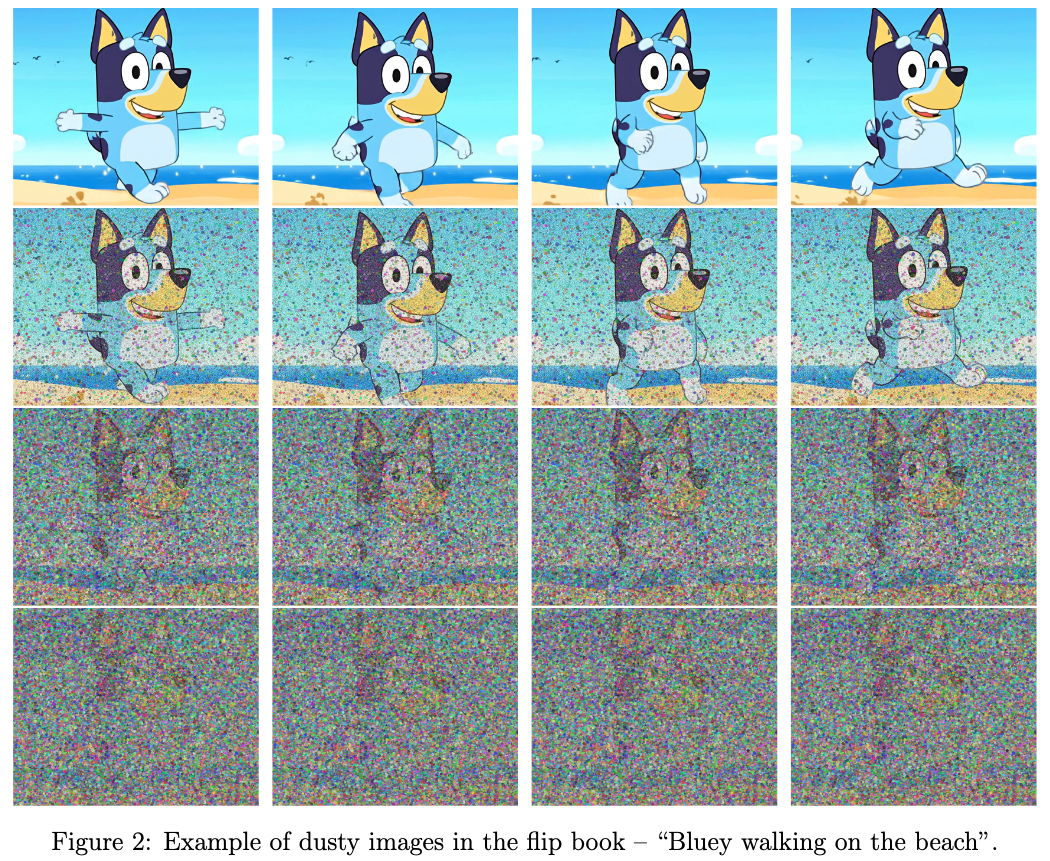
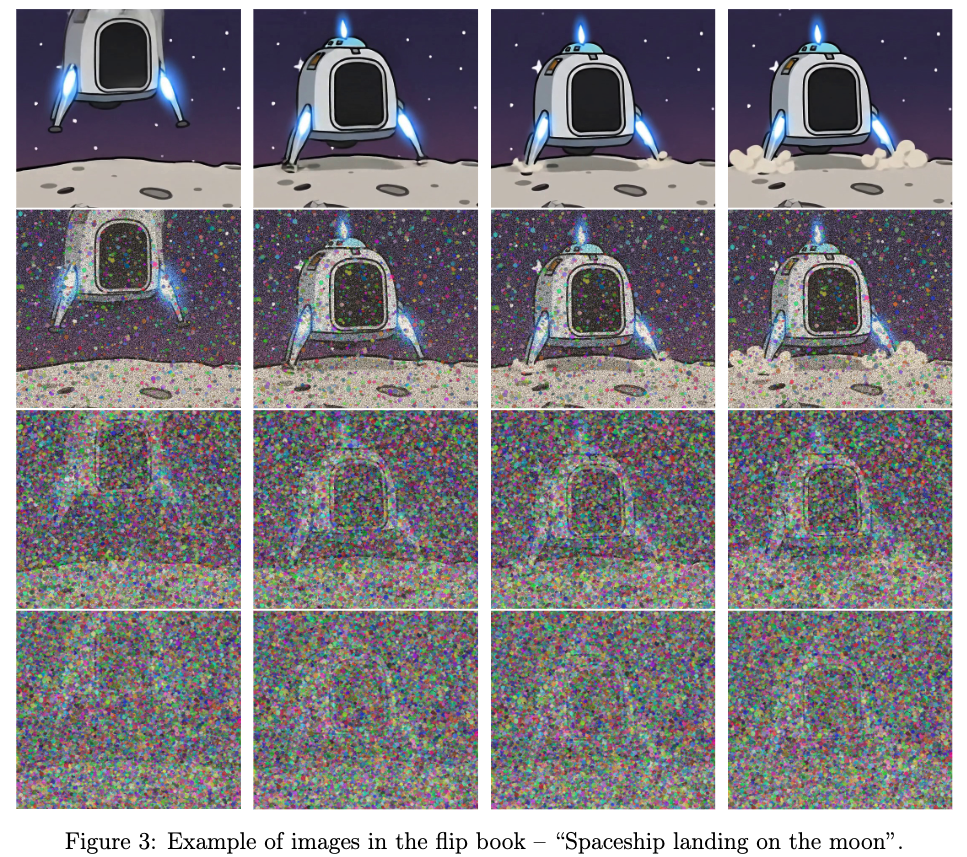
<p>She brings out some flip books filled with clear and neat pictures in a sequence. But then she remembers her last fun experiment and decides to spice things up! Instead of showing the perfect flip books, she grabs a bag of magic dust and sprinkles it all over the pages, covering the pictures in funny little dots.</p>

<hr />

<p><img src="/images/posts/2025-09-21-genai-video-diffusion-images/2.png" alt="Flipbook Bluey" /></p>

<hr />

<p><img src="/images/posts/2025-09-21-genai-video-diffusion-images/3.png" alt="Flipbook Spaceship" /></p>

<hr />

<p>The students giggle and look closely at the different flip books, trying to spot the objects of interest hidden in the noisy, dusty pictures. Like previously, the teacher then divided the class into two teams and announced that each team would learn about the pictures in a different way.</p>

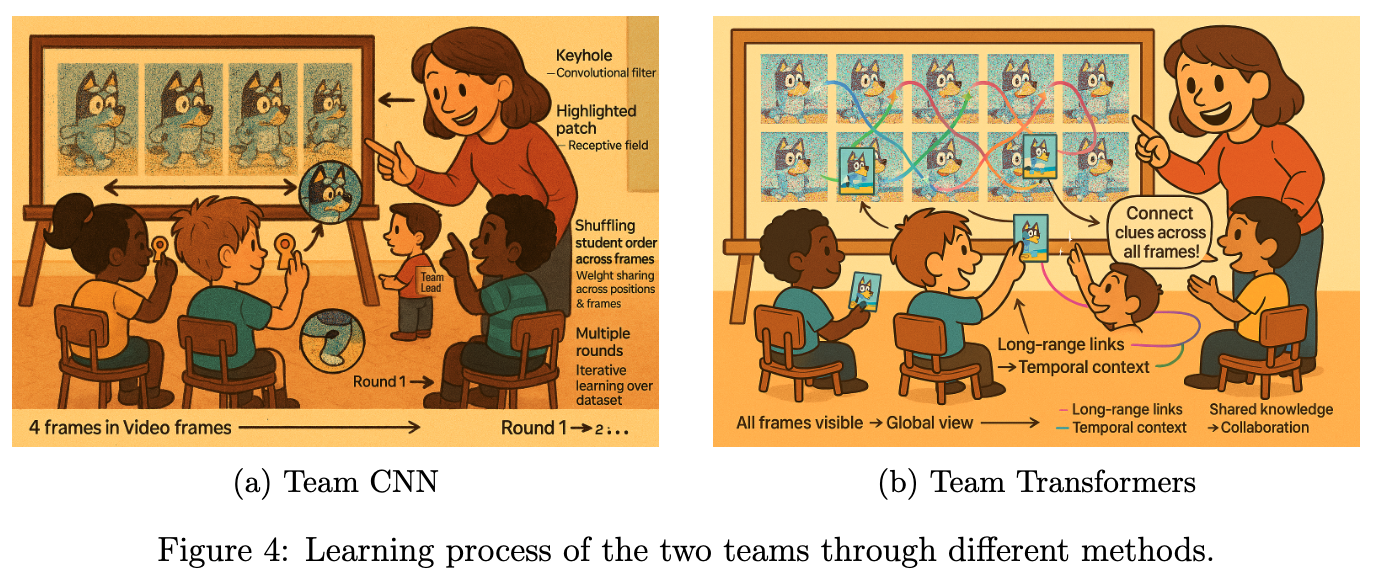
<h2 id="team-cnn-the-keyhole-explorers">Team CNN: The Keyhole Explorers</h2>

<p>The teacher gathered the students around and revealed four image frames of Bluey running joyfully along the beach where each frame captured a different moment.</p>

<p>To make the learning process magical, the teacher appointed a team lead and said:</p>

<blockquote>
  <p>“The team lead’s special job will be to decide the order in which the students would stand. But here’s the twist: each time, the order will be completely random!”</p>
</blockquote>

<p>The adventure began.</p>

<ul>
  <li><strong>First round</strong>: The team lead called out a random order. Each student, clutching their magic cardboard keyhole, stepped up to peek at a tiny part of one frame. Maybe one saw Bluey’s ear, another the sparkling sand, another a patch of sky and verified their understanding from the teacher. Their task was to study the fine details of their assigned part, memorizing every curve and color.</li>
  <li><strong>Next round</strong>: The team lead shuffled the order again. Now, each student peered through their keyhole at a different frame and a different part. The details changed: sometimes it was Bluey’s tail, sometimes a seashell, sometimes the foamy edge of a wave. Each student compared what they saw with what they’d learned before, noticing how the same object could look different in another frame.</li>
  <li><strong>And Again</strong>: The process repeated, with the team lead inventing new orders each time. Students swapped frames and parts, learning about every detail from every possible perspective. The classroom buzzed with excitement as discoveries piled up.</li>
  <li><strong>Exhausting All Orders</strong>: The team lead kept going until every possible order had been tried. By the end, each student had seen every part of every frame, but always through their tiny keyhole - never the whole picture at once.</li>
</ul>

<p>The students became experts at recognizing tiny details, no matter where they appeared or in which frame. They were like detectives, piecing together the story from small clues. Even though they never saw the whole image at once, their combined knowledge helped them understand the entire sequence of Bluey’s run.</p>

<p><img src="/images/posts/2025-09-21-genai-video-diffusion-images/4.png" alt="Learning Process" /></p>

<h2 id="team-transformers-the-puzzle-patchers">Team Transformers: The Puzzle Patchers</h2>

<p>While Team CNN explored the flip book frame by frame, for Team Transformers the teacher had a different approach. She said:</p>

<blockquote>
  <p>“You will not have any team lead. But I want all of you to talk to each other to figure out the details.”</p>
</blockquote>

<p>Instead of looking at one image at a time, the teacher gave them a giant board filled with patches from all the images in the video flip book - like a huge jigsaw puzzle scattered across time. Each student received several puzzle patches, but these patches weren’t just from one frame - they came from different moments in the story. Some showed Bluey’s tail in the first frame, others the waves in the middle, and some the sky in the last frame. The challenge was to figure out how all these pieces fit together, not just within a single image, but across the entire sequence. The teacher encouraged the students to talk, swap patches, and look for patterns that connected the beginning, middle, and end of the video.</p>

<blockquote>
  <p>“Notice how Bluey’s tail moves from left to right across the frames,” she said. “Or how the color of the sky changes as the story unfolds. Your job is to connect these clues and build the whole story in your minds.”</p>
</blockquote>

<p>As the students worked together, they realized something magical: by seeing patches from all the images at once, they could understand how every part of the video was related. They spotted patterns that stretched across time - how the sand sparkled in every frame, how Bluey’s run became faster, and how the waves rolled in and out.</p>

<p>Unlike keyhole explorers, puzzle patchers did not just learn about one image at a time. They learned about the whole video - how every patch, every detail, and every moment fit together to create a smooth, flowing story. the teacher continued the experiment with the other flip books she had.</p>

<h1 id="the-magic-movie-challenge">The magic movie challenge</h1>

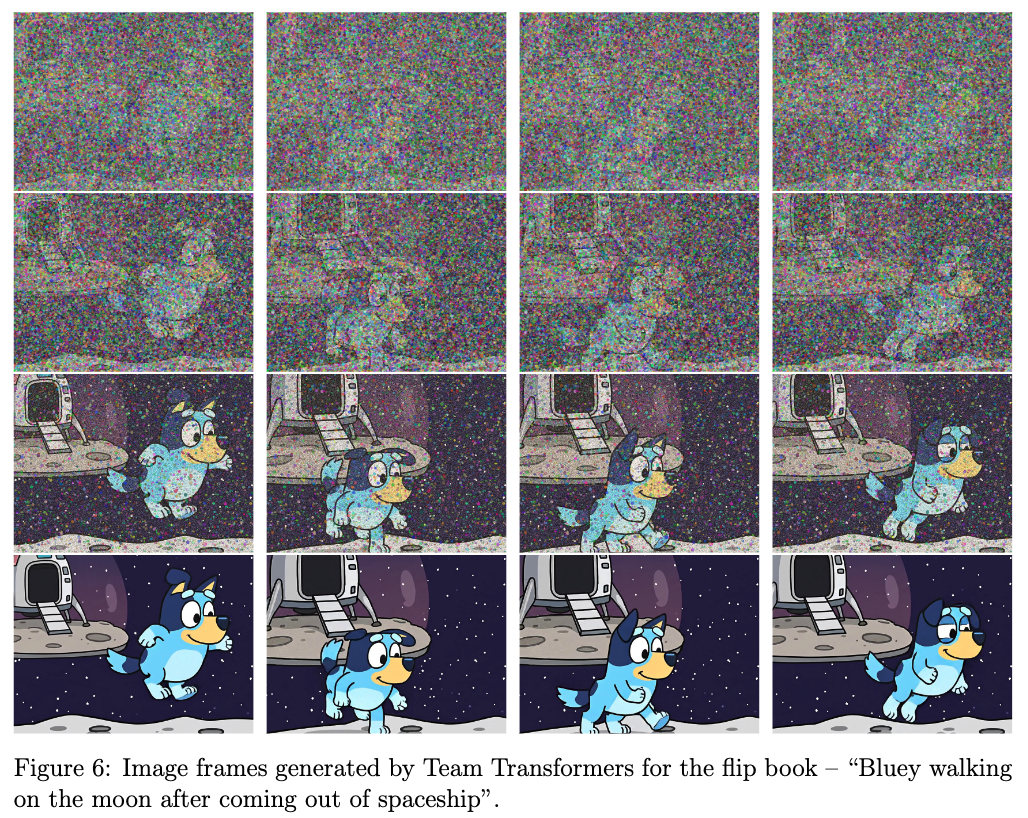
<p>The teacher clapped her hands and wrote today’s challenge on the board, in big, shimmering chalk: <em>Bluey walking on the moon after coming out of the spaceship</em>.</p>

<blockquote>
  <p>“Class,” she said, “this is our story prompt. Every frame you draw should follow this idea. Bluey steps out, touches moon dust, takes a few bouncy steps, and the spaceship glows behind. We want the whole flipbook to feel like one smooth scene.”</p>
</blockquote>

<p>She placed blank pages on every desk and, as before, sprinkled a thin fog of magic dust over them. “We’ll clear the dust little by little,” she smiled. “Each pass makes the pictures cleaner. After every pass I’ll check how well your drawings match the story and give you feedback so you can improve.”</p>

<blockquote>
  <p>“Small steps, steady changes,” she repeated. “Let the moon feel light beneath Bluey’s feet.”</p>
</blockquote>

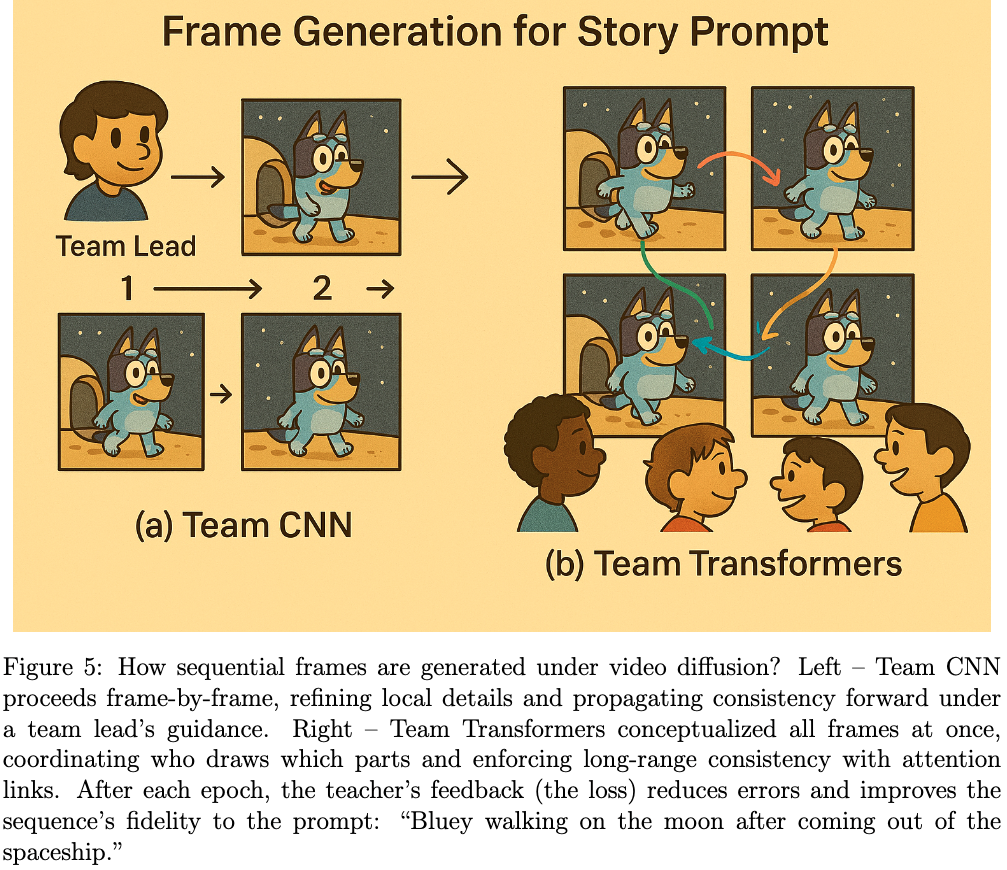
<p><strong>Team CNN: The Keyhole Explorers</strong> - The Team Lead stood up and said, “Let’s draw our story one frame at a time! I’ll tell you who goes first.”</p>

<ul>
  <li><strong>First round</strong>: The first student drew Bluey stepping out of the spaceship. The next student drew Bluey taking a small step onto the moon. The third added Bluey’s paw touching the moon dust. Each student focused on their own frame, making sure to change just a little bit from the last one—like flipping through a cartoon book.</li>
  <li><strong>Teacher’s feedback</strong>: The teacher looked at all the pictures and said, “Nice job! But Bluey’s steps are too big, and the stars moved. Next time, make smaller changes and keep the background the same.”</li>
  <li><strong>Next rounds</strong>: The Team Lead switched up who drew which frame. Some students worked on footprints, others on the spaceship. With each round, the drawings got smoother and more connected. The team learned to copy a little from the frame before and make tiny changes, so the story looked just right.</li>
</ul>

<p><img src="/images/posts/2025-09-21-genai-video-diffusion-images/5.png" alt="Frame Alignment" /></p>

<p><strong>Team Transformers: The Puzzle Patchers</strong> - The teacher smiled and said, “You don’t need a team lead. Instead, talk to each other and plan together!”</p>

<ul>
  <li><strong>First round</strong>: The students gathered around a big board showing all the frames at once. They chatted and decided who would draw which part of the story. “I’ll draw Bluey stepping out of the spaceship!” “I’ll add the moon dust and footprints!” “I’ll make sure the stars and spaceship look the same in every frame!” They worked together, sharing ideas and making sure every frame fit perfectly with the others - like putting together a giant puzzle.</li>
  <li><strong>Teacher’s feedback</strong>: The teacher looked at their drawings and said, “Great teamwork! But Bluey’s footprints are too close together, and the spaceship glow changes. Next time, keep things steady and spread out the footprints.”</li>
  <li><strong>Next rounds</strong>: The students talked even more, fixing their pictures and helping each other. They made sure Bluey’s walk looked smooth and the moon scene stayed the same. By the end, their flip book told the story just right—everyone’s drawings matched up, and Bluey’s adventure flowed from start to finish!</li>
</ul>

<p>In the end, both teams made something really beautiful out of the dusty mess, and the pictures looked almost perfect! Just like you can see in Figure 6, Team Transformer did a great job showing exactly what the teacher asked for - <em>Bluey walking on the moon after coming out of the spaceship</em></p>

<p><img src="/images/posts/2025-09-21-genai-video-diffusion-images/6.png" alt="Video generation" /></p>

<h1 id="the-magic-machine-analogy">The Magic Machine Analogy</h1>

<p>In the world of modern AI, our story mirrors the inner workings of a magic machine, a generative model that can turn words into moving pictures. Here is how the pieces fit, which a more experienced reader might find analogous in the following way:</p>

<ul>
  <li><strong>Learning Backbone → The Builders</strong>: The machine needs strong builders to understand patterns. These are like the CNN team (masters of local details) and the Transformer team (experts in global context). Together, they form the backbone that learns how images are structured. In contrast to the diffusion models in this magical machine, there’s a special helper for the CNN team: the class monitor, a wise and watchful figure who ensures every student’s work fits together. Whenever a student forgets a detail from earlier, the monitor whispers a reminder, helping everyone remember what came before and making sure the story stays consistent from start to finish. This is analogous to skip connection mechanism. For the transformer team they can talk with each other to figure out the flow.</li>
  <li><strong>Language Alignment → The Teacher’s Instructions</strong>: Like the teacher gave clear directions—“Bluey walking on the moon after coming out of the spaceship”, the magic machine uses language-image alignment (like CLIP) to connect what we say with what it draws.</li>
  <li><strong>Generative Power → The Creative Drawing</strong>: When the machine starts creating, it’s like the students drawing the scene from the teacher’s words. This is the essence of Generative AI - turning text into sequential pictures.</li>
  <li><strong>Mode Collapse → Everyone Drawing the Same Thing</strong>: To avoid everyone’s drawing looking similar, the teacher adds the dust concept. That’s like mode collapse, where the model produces similar outputs instead of diverse ones, which can be avoided by adding random noise in the learning process.</li>
</ul>

<h1 id="conclusion">Conclusion</h1>

<p>In the end, the classroom experiment showed something amazing: making pictures and movies isn’t just about copying what you see - it’s about building something new from a messy start! The team CNN became experts at tiny things, the Team transformers learned how everything fits together, and the teacher’s instructions helped everyone turn words into pictures. The students learned to construct the picture from scratch, guided only by the story. This mirrors how modern generative models work:</p>

<ul>
  <li>Backbones like CNNs and Transformers provide the foundation.</li>
  <li>Language alignment (such as CLIP) connects words to images.</li>
  <li>Diffusion strategies start from noise and iteratively de-noise, ensuring diversity and creativity while staying true to the prompt.</li>
  <li>A global context for frame alignment is adopted in a smart way.</li>
</ul>

<p>Just like the students’ final flip books, these magical models turn random chaos into wonderful movies—one step at a time, guided by the story.<br />
<em>“From dust to detail, video diffusion models create magic, turning words into moving pictures!”</em></p>

<h1 id="glossary">Glossary</h1>

<table>
  <thead>
    <tr>
      <th>Term</th>
      <th>Meaning</th>
    </tr>
  </thead>
  <tbody>
    <tr>
      <td><strong>AI</strong></td>
      <td>Artificial Intelligence</td>
    </tr>
    <tr>
      <td><strong>CNN</strong></td>
      <td>Convolutional Neural Network</td>
    </tr>
    <tr>
      <td><strong>CLIP</strong></td>
      <td>Contrastive Language Image Pretraining</td>
    </tr>
    <tr>
      <td><strong>Diffusion</strong></td>
      <td>The process of adding and removal noise to a picture</td>
    </tr>
    <tr>
      <td><strong>Factorized Diffusion</strong></td>
      <td>The process of diffusion in steps</td>
    </tr>
    <tr>
      <td><strong>Language Alignment</strong></td>
      <td>Turn text into pictures</td>
    </tr>
    <tr>
      <td><strong>Mode Collapse</strong></td>
      <td>When a computer generates the same picture over and over</td>
    </tr>
    <tr>
      <td><strong>Transformers</strong></td>
      <td>Neural network architecture for context understanding</td>
    </tr>
  </tbody>
</table>]]></content><author><name>Sandipan Das</name></author><category term="GenAI" /><category term="VideoDiffusionModels" /><category term="WANAI" /><category term="MochiAI" /><category term="StableVideoDiffusion" /><category term="MachineLearning" /><category term="Storytelling" /><summary type="html"><![CDATA[]]></summary></entry><entry><title type="html">Generative AI for all: Diffusion models</title><link href="https://mrsandipandas.github.io/posts/2025/09/genai/diffusion" rel="alternate" type="text/html" title="Generative AI for all: Diffusion models" /><published>2025-09-14T00:00:00-07:00</published><updated>2025-09-14T00:00:00-07:00</updated><id>https://mrsandipandas.github.io/posts/2025/09/genai/genai-diffusion</id><content type="html" xml:base="https://mrsandipandas.github.io/posts/2025/09/genai/diffusion"><![CDATA[<!--more-->

<h1 id="introduction">Introduction</h1>

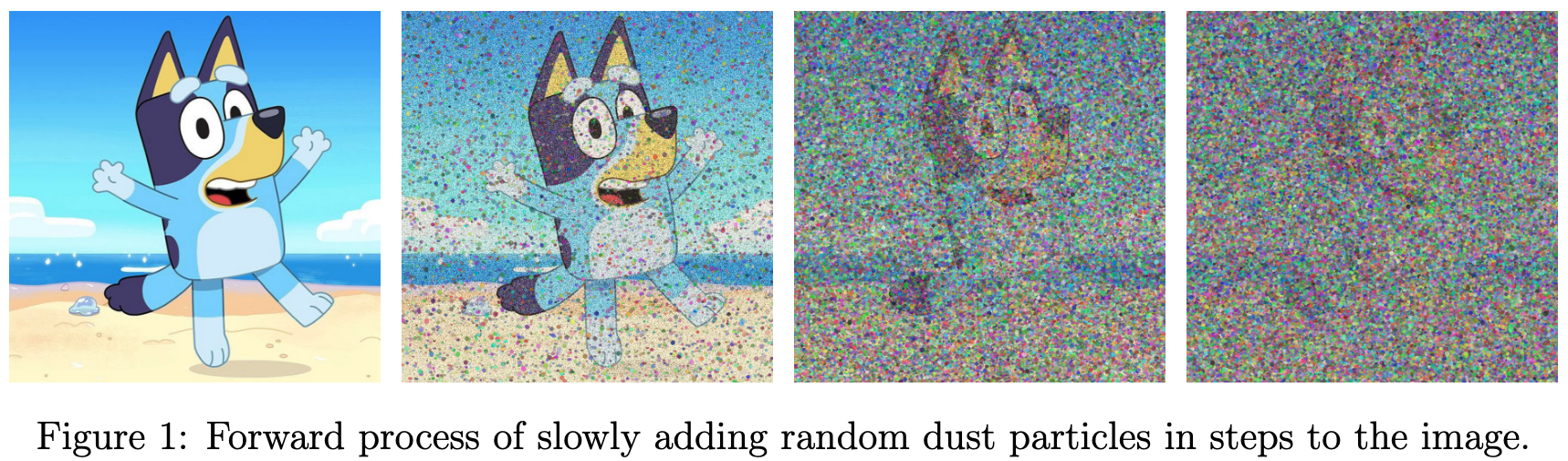
<p>Imagine you have a beautiful drawing of a <code class="language-plaintext highlighter-rouge">Bluey</code> — a playful six-year-old Blue Heeler pup. Now, imagine you slowly sprinkle tiny dots of dust all over it, little by little, until the whole picture turns into a messy cloud of dust. That’s called diffusion — the process of turning a clear image into a noisy one.</p>

<p><img src="/images/posts/2025-09-14-genai-diffusion-images/1.png" alt="Forward process of slowly adding random dust particles in steps to the image." /></p>

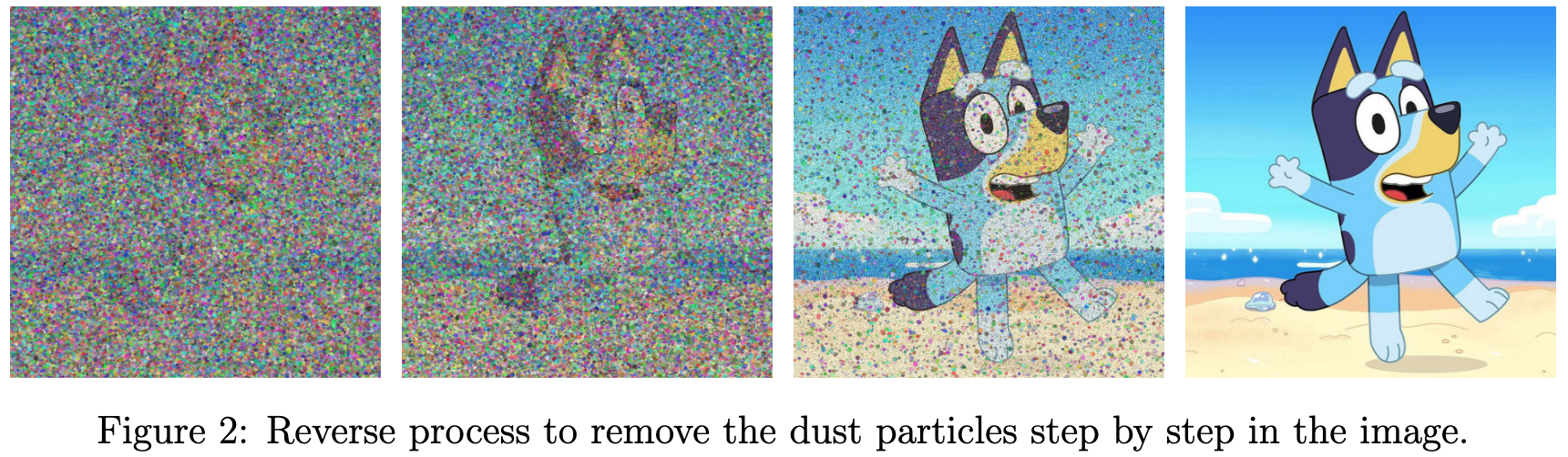
<p>Now here’s the cool part: what if you had a magical machine that could look at that cloud of dust and slowly clean it up, step by step, until the <code class="language-plaintext highlighter-rouge">Bluey</code> drawing comes back? That’s what a diffusion model does! Guess what? These magic models can even make pictures just by listening to words! But shhh… let’s keep that secret in our pocket for later. But how can this magical machine make even more pictures of Bluey that I didn’t show it? If you’re still curious, keep reading—it’s a pretty cool story!</p>

<p><img src="/images/posts/2025-09-14-genai-diffusion-images/2.png" alt="Reverse process to remove the dust particles step by step in the image." /></p>

<h1 id="on-learning-of-magical-machines">On learning of magical machines</h1>

<p>Imagine a lively classroom filled with curious kids. One day, the teacher walks in with a big smile and announces a challenge:</p>

<blockquote>
  <p>Today, I want you to draw something amazing: “Bluey sitting in a spaceship flying near the moon.”</p>
</blockquote>

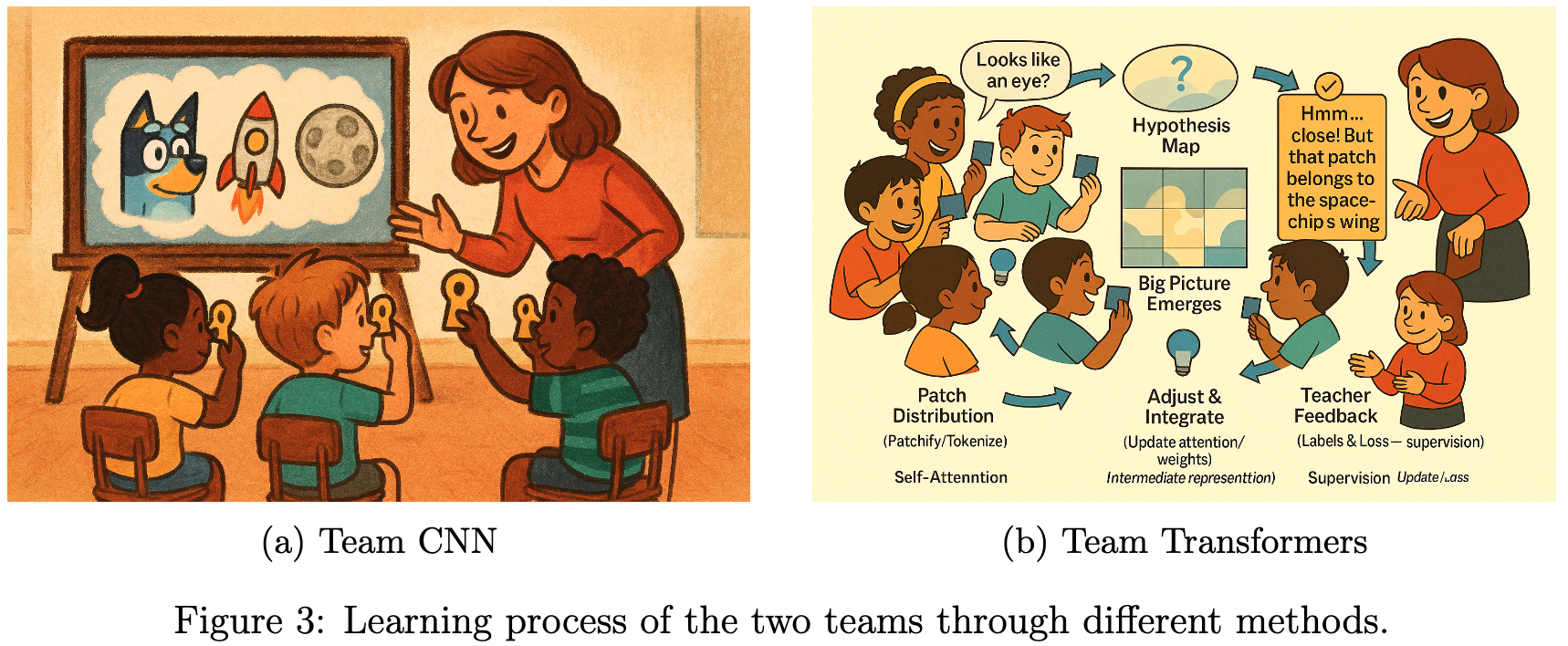
<p>The kids cheer — but the teacher has a twist. Before they start drawing, the teacher brings in lots of pictures of Bluey, spaceships, and moons. The teacher then divided the class into two teams and announces that each team will learn about the pictures in a different way.</p>

<h2 id="team-cnn-the-keyhole-explorers">Team CNN: The Keyhole Explorers</h2>

<p>For the first team, the teacher had a quirky idea. She handed each student a tiny cardboard keyhole and said,</p>

<blockquote>
  <p>You’ll look at the pictures one tiny piece at a time — like peeking through a secret portal!</p>
</blockquote>

<p>So the students lined up, one by one, peeking through their keyholes at pictures of Bluey, spaceships, and moon. One student saw a fuzzy curve. “Hmm… that looks like an ear!” the teacher whispered. Another spotted a shiny patch. “That’s probably the spaceship’s window,” she said. Every time they peeked, the teacher gave them clues — helping them understand what that little piece might be. Over time, the students became mini detectives, learning to recognize each part of the image from just a glimpse. They didn’t see the whole picture at once, but they got really good at figuring out the details. They became puzzle solvers who knew each piece by heart — even if they never saw the full puzzle all at once.</p>

<p><img src="/images/posts/2025-09-14-genai-diffusion-images/3.png" alt="Teams" /></p>

<h2 id="team-transformers-the-puzzle-patchers">Team Transformers: The Puzzle Patchers</h2>

<p>For the second team, the teacher had a totally different idea — and it felt like a game of group detective work. She snipped all the pictures of Bluey, spaceships, and moons, into small square patches and handed one to each student. Then she said with a grin:</p>

<blockquote>
  <p>Your patch is just one tiny piece of the puzzle. Talk to your friends, figure out what your patch might be, and where it fits. Then tell me what you think — and I’ll help you get it right!</p>
</blockquote>

<p>So the classroom buzzed with excitement. One student shouted, “Mine looks like part of an eye!” Another replied, “Yours? That might be the moon’s surface!” They huddled together, comparing patches, swapping ideas, and slowly piecing together the big picture — like assembling a giant jigsaw puzzle without the box cover. Every time they thought they had it figured out, they’d run to the teacher, who’d give them feedback:</p>

<blockquote>
  <p>Hmm… close! But that patch belongs to the spaceship’s wing, not Bluey’s tail.</p>
</blockquote>

<p>Back they’d go, chatting and adjusting, learning not just from their own patch but from everyone else’s. They weren’t just solving their own piece — they were learning how all the pieces fit together.</p>

<h1 id="the-magic-drawing-challenge">The magic drawing challenge</h1>

<p>Once the teacher finished her classes with both the teams, the teacher clapped her hands for everyone’s attention.</p>

<blockquote>
  <p>“Now,” she announced, “it’s time for The Magic Drawing Challenge!”</p>
</blockquote>

<p>She didn’t show any new picture. Instead, she re-read the challenge aloud again.</p>

<blockquote>
  <p>“Bluey is sitting in a spaceship flying near the moon.”<br />
“Your job,” she said, “is to turn my words into a beautiful drawing.”</p>
</blockquote>

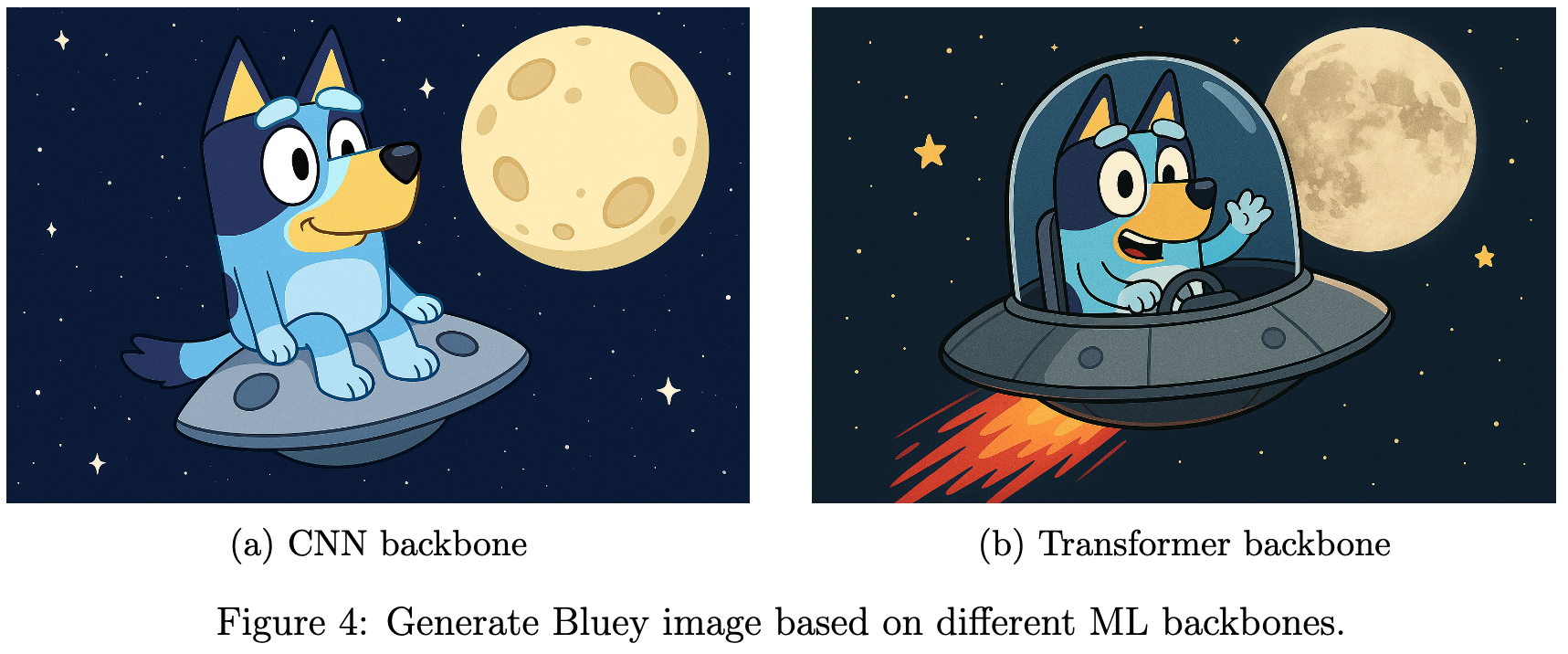
<p>The room went silent for a heartbeat—and then pencils and colours began to dance. The <em>CNN team</em> drew excellent details: the shiny panels of the spaceship, the soft curve of an ear, the pitted moon texture. The <em>Transformer team</em> sketched a coherent scene quickly: where Bluey sits, how the spaceship faces the moon, how everything fits together. The teacher kept circling, offering tiny improvements like:</p>

<blockquote>
  <p>“Make Bluey sit inside the spaceship.”<br />
“Bring the moon closer so it’s clearly near.”<br />
“Let’s show the spaceship actually flying — add stars, a glow, a trail.”</p>
</blockquote>

<p>With each small suggestion, the students’ drawings moved closer and closer to the teacher’s instruction. But something interesting happened: by the end, the final drawings from all students in each team looked strikingly similar (as shown in the figure below).</p>

<p><img src="/images/posts/2025-09-14-genai-diffusion-images/4.png" alt="Backbones" /></p>

<ul>
  <li><strong>Team CNN</strong>: Their drawings had excellent local details — the spaceship panels were sharp, the moon’s craters were textured, and Bluey’s fur looked realistic. But the overall composition often felt fragmented, as if the parts didn’t fully belong together, like Bluey sitting over the spaceship, instead of sitting inside.</li>
  <li><strong>Team Transformers</strong>: Their drawings captured the global layout well — Bluey inside the spaceship, the moon in the background, and a sense of motion. However, some fine details were missing or simplified, making the image less rich in texture.</li>
</ul>

<p>Despite these differences, there was hardly any innovation. Why? Because all students started from similar mental templates of the original pictures they had memorized. When asked to draw from the instruction, they simply reassembled what they already knew, leading to convergent, almost identical outputs for each team, which got refined step by step under the teacher’s guidance.</p>

<h3 id="the-dusty-trick">The dusty trick</h3>

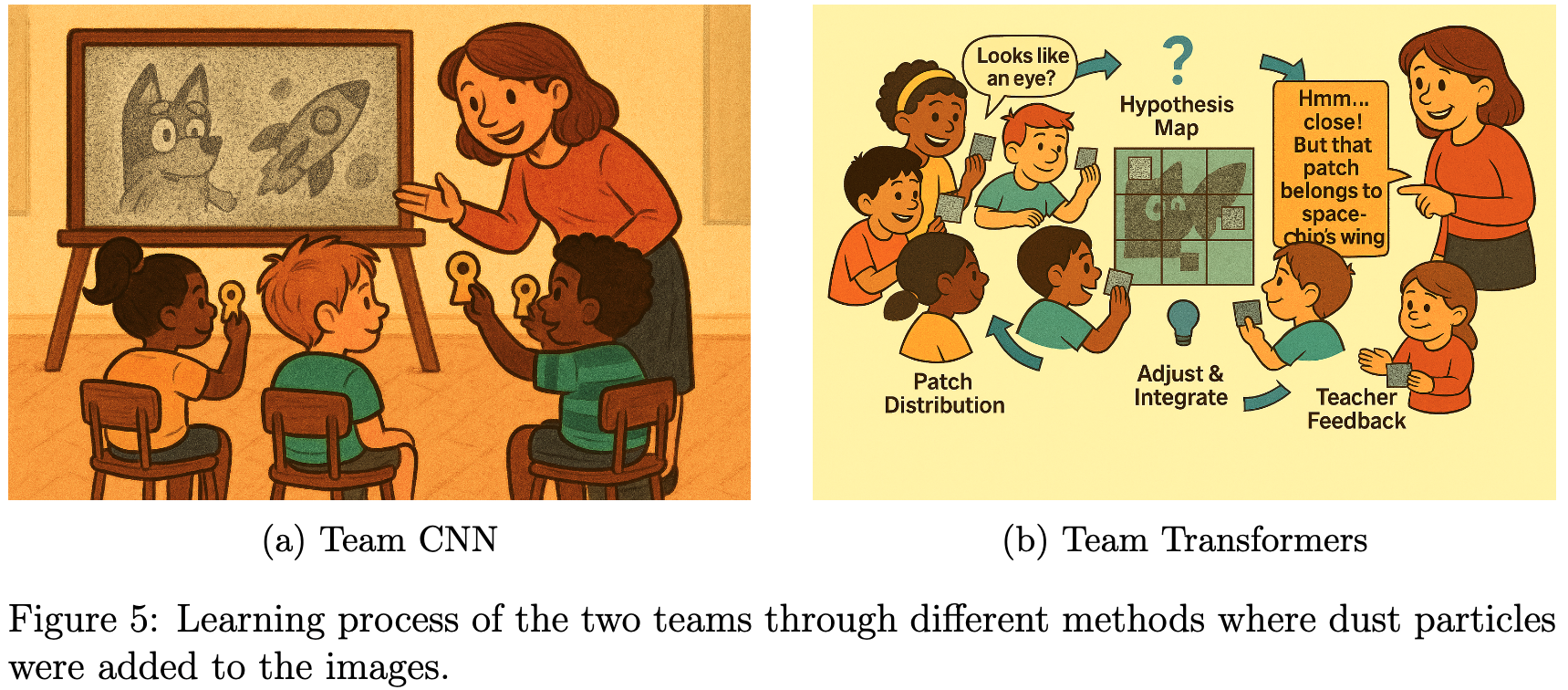
<p>Although the results from both the teams look good, the teacher was mildly disappointed as she didn’t get to see the creative part of all the students. So, she re-planned her teaching strategy for the two groups. This time, she didn’t just show them clean pictures of Bluey, spaceships, and the moon. Instead, she sprinkled magic dust over the images before showing them. This dust made the pictures look blurry and speckled, so the students had to guess and reason about what they were seeing.</p>

<ul>
  <li>For the <em>CNN team</em>, like earlier, the teacher revealed the dusty images through a cardboard keyhole, so they learned to recognize local features even in noisy conditions - like spotting an ear or a wing despite the blur.</li>
  <li>For the <em>Transformer team</em>, the teacher gave them dusty patches and asked them to talk to each other to figure out what each patch might represent. This taught them to share context and handle uncertainty together.</li>
</ul>

<p><img src="/images/posts/2025-09-14-genai-diffusion-images/5.png" alt="Team dusty" /></p>

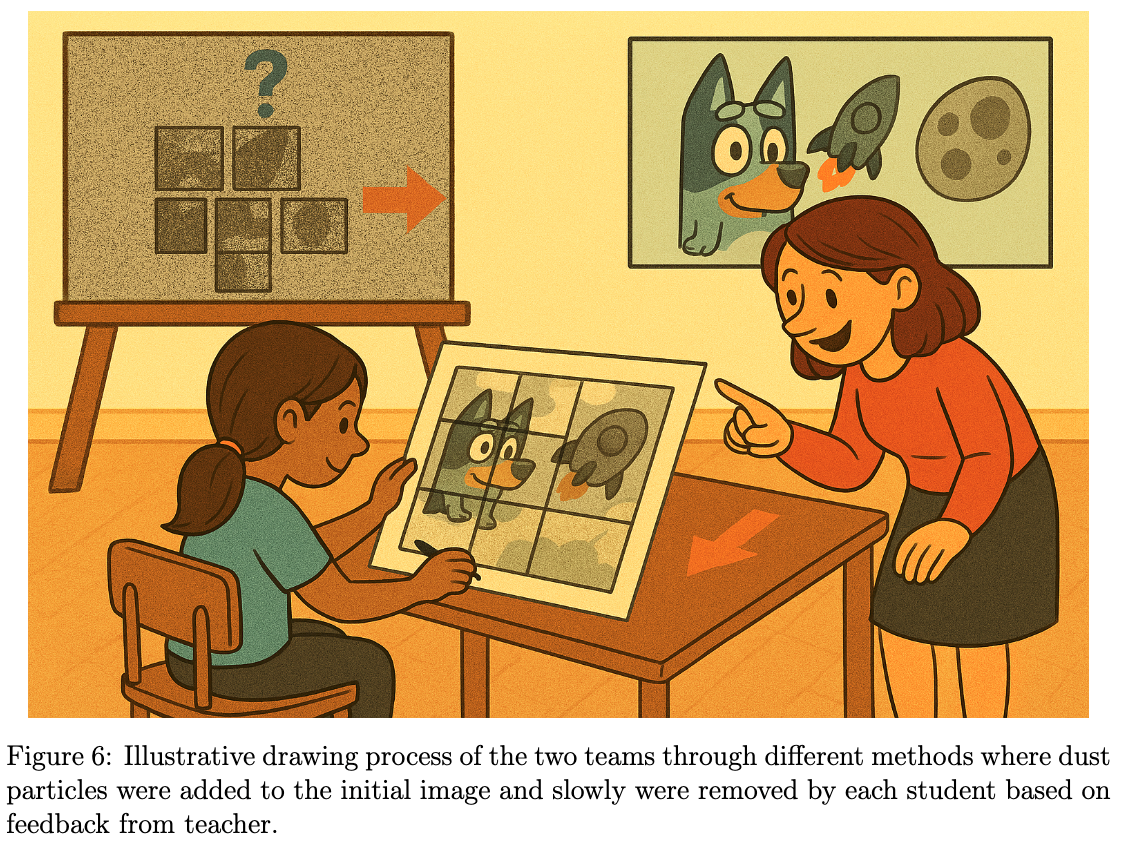
<p>Later, when the teacher gave the final magic drawing challenge again - she didn’t let them start on a clean sheet. Instead, she covered their papers with random dusty patterns and said:</p>

<blockquote>
  <p>“Now I’ll tell you a secret. Before you even start drawing, your brain has learned a special sketchbook from the dusty examples which you have seen - a latent place where you imagine things before putting them on paper. It’s like a magical notebook where ideas live as fuzzy shapes and feelings, waiting to become real pictures.”</p>
</blockquote>

<p>The students gasped. “So we will draw from our imagination?”</p>

<blockquote>
  <p>“Exactly!” said the teacher. “And here’s another trick — the dust I gave you wasn’t random. I used a dusty clock — a timer that decides how much dust to add or remove at each step. At first, it’s super dusty, and then it gets cleaner and cleaner. That’s called a noise schedule. It helps you slowly uncover your sketch, with my feedback, one layer at a time.”</p>
</blockquote>

<p>The students nodded, imagining their sketchbooks filled with swirling clouds of ideas and a magical clock ticking as they cleaned and created. Each student began with a different dust pattern, so their starting points were unique. With every round of feedback, they removed some dust and added clearer details, gradually transforming chaos into a meaningful picture.</p>

<ul>
  <li>The <em>CNN team</em> students focused on cleaning and refining local details first.</li>
  <li>The <em>Transformer team</em> students worked on the overall structure early on.</li>
</ul>

<p>In the end, all drawings matched the description of the teacher. But because the students had learned about the objects through dust-covered images - forcing them to build imaginative mental models - and started from different noisy beginnings, their final artworks showed greater diversity in style and composition compared to the earlier approach, where everyone relied on memorized templates.</p>

<p><img src="/images/posts/2025-09-14-genai-diffusion-images/6.png" alt="Drawing process" /></p>

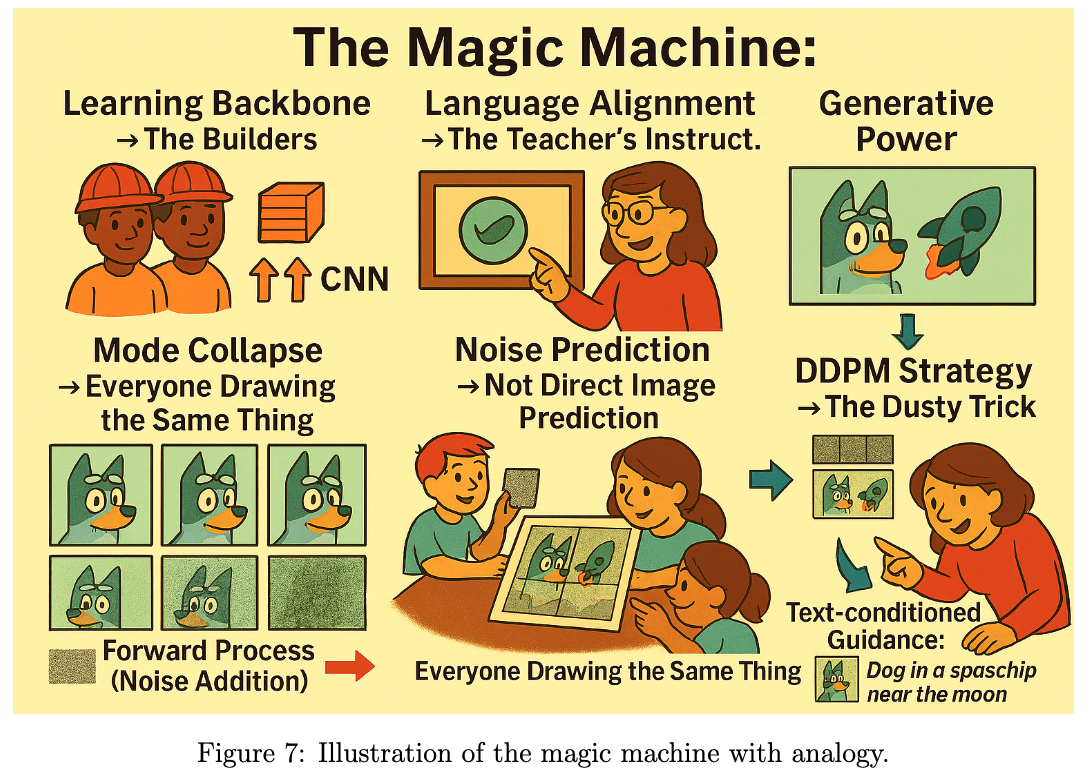
<h2 id="the-magic-machine-analogy">The Magic Machine Analogy</h2>

<p>In the world of modern AI, our story mirrors the inner workings of a magic machine, a generative model that can create new images from words. Here is how the pieces fit, which a more experienced reader might find analogous in the following way:</p>

<ul>
  <li><strong>Learning Backbone → The Builders</strong>: The machine needs strong builders to understand patterns. These are like the CNN team (masters of local details) and the Transformer team (experts in global context). Together, they form the backbone that learns how images are structured.</li>
  <li><strong>Language Alignment → The Teacher’s Instructions</strong>: Like the teacher gave clear directions—“Bluey sitting in a spaceship near the moon”, the magic machine uses language-image alignment (like CLIP) to connect what we say with what it draws.</li>
  <li><strong>Generative Power → The Creative Drawing</strong>: When the machine starts creating, it’s like the students drawing the scene from the teacher’s words. This is the essence of Generative AI - turning text into pictures.</li>
  <li><strong>Mode Collapse → Everyone Drawing the Same Thing</strong>: Remember how the final drawings of all the students looked almost identical? That’s like mode collapse, where the model produces similar outputs instead of diverse ones.</li>
  <li><strong>DDPM Strategy → The Dusty Trick</strong>: To avoid memorization and encourage creativity, the teacher sprinkled magic dust on the paper, making students start from random scribbles and refine step by step. This is exactly what DDPM does.</li>
</ul>

<p><img src="/images/posts/2025-09-14-genai-diffusion-images/7.png" alt="Magic machine" /></p>

<h2 id="conclusion">Conclusion</h2>

<p>In the end, the classroom experiment revealed something profound: Learning to create is not just about memorizing what you have seen, it is about building meaning from uncertainty. The CNN team mastered local details, the Transformer team understood global context, and the teacher’s instructions acted as a bridge between language and vision.</p>

<p>But the real magic happened when the teacher introduced the dusty settings. By starting from noisy, chaotic beginnings and refining step by step, the students learned to construct the picture from scratch, guided only by the story. This mirrors how modern generative models work:</p>

<ul>
  <li>Backbones like CNNs and Transformers provide the foundation.</li>
  <li>Language alignment (such as CLIP) connects words to images.</li>
  <li>Diffusion strategies start from noise and iteratively de-noise, ensuring diversity and creativity while staying true to the prompt.</li>
</ul>

<p>Just like the final drawings of the students, these models transform randomness into meaning - turning words into pictures. <em>“From dust to detail, generative models turn random chaos into meaningful representation - guided one step at a time.”</em></p>

<h2 id="glossary">Glossary</h2>

<table>
  <thead>
    <tr>
      <th>Term</th>
      <th>Meaning</th>
    </tr>
  </thead>
  <tbody>
    <tr>
      <td><strong>AI</strong></td>
      <td>Artificial Intelligence</td>
    </tr>
    <tr>
      <td><strong>CNN</strong></td>
      <td>Convolutional Neural Network</td>
    </tr>
    <tr>
      <td><strong>CLIP</strong></td>
      <td>Contrastive Language Image Pretraining</td>
    </tr>
    <tr>
      <td><strong>DDPM</strong></td>
      <td>Denoising Diffusion Probabilistic Model</td>
    </tr>
    <tr>
      <td><strong>Diffusion</strong></td>
      <td>The process of adding and removing noise to a picture</td>
    </tr>
    <tr>
      <td><strong>Language Alignment</strong></td>
      <td>Turn text into pictures</td>
    </tr>
    <tr>
      <td><strong>Mode Collapse</strong></td>
      <td>When a computer generates the same picture repeatedly</td>
    </tr>
    <tr>
      <td><strong>Transformers</strong></td>
      <td>Neural network architecture for context understanding</td>
    </tr>
  </tbody>
</table>]]></content><author><name>Sandipan Das</name></author><category term="GenAI" /><category term="DiffusionModels" /><category term="Dall.E" /><category term="StableDiffusion" /><category term="AI" /><category term="MachineLearning" /><category term="Storytelling" /><summary type="html"><![CDATA[]]></summary></entry></feed>